
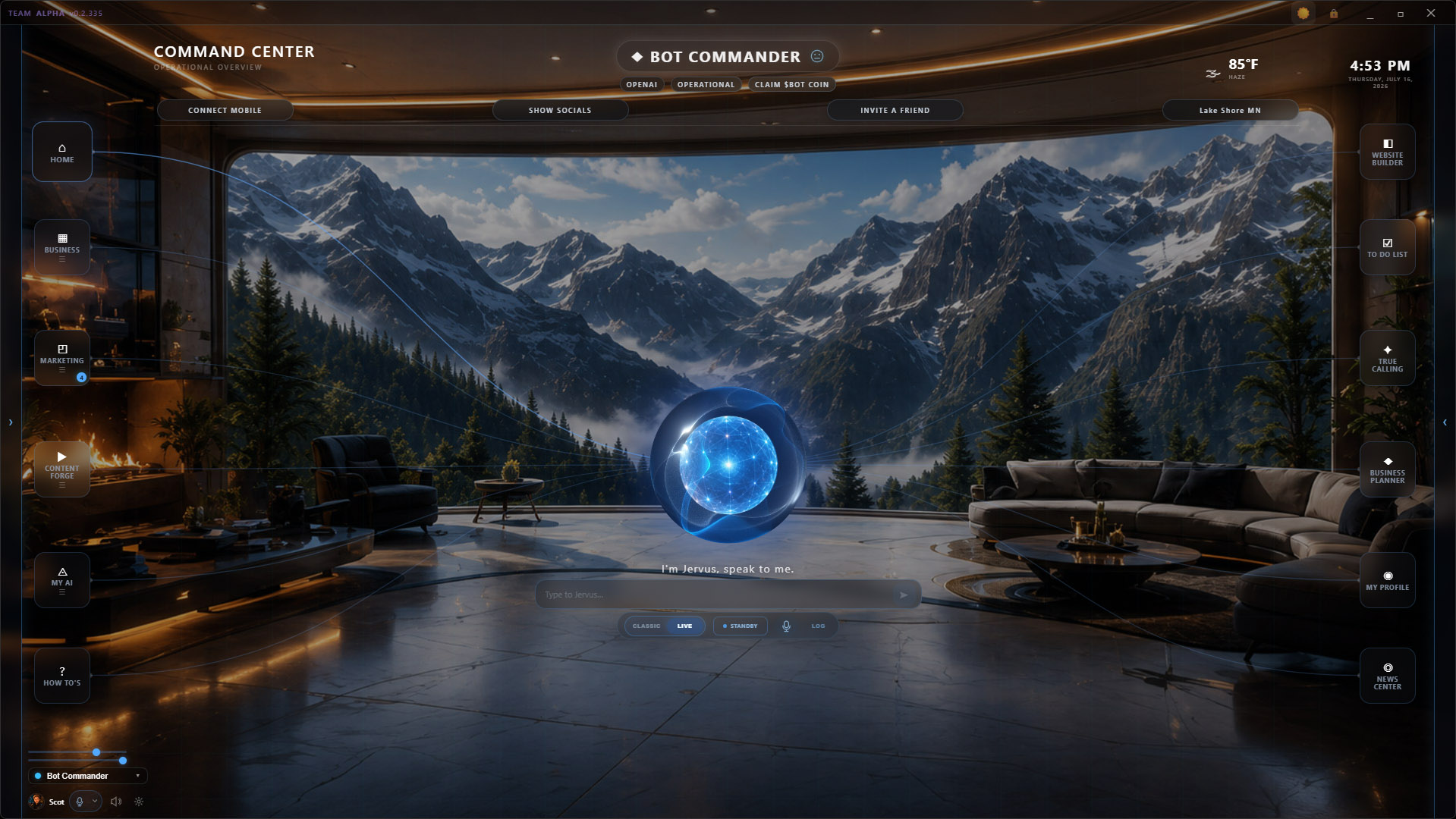
Bot Commander 0.2.337 is our largest Early Access update yet. It brings a redesigned Command Center, a more capable AI marketing operating system, and a shorter, conversational Business Setup experience. It also strengthens voice interaction, agent execution, creative production, protected browser and Windows operations, and everyday reliability.
This release brings together work completed since the public 0.2.335 build.
1. A redesigned Command Center that feels alive
The new radial Command Center puts your selected Commander at the center of the workspace. Navigation, live identity, active work, intelligence, voice state, and everyday tools now feel like parts of one cohesive operating system instead of separate screens.
The selected Commander identity also carries into setup and the org chart, helping the experience remain consistent as you move through the app.
Major work surfaces—including Business Setup, campaign operations, and Review Queue—now share a clearer, high-contrast glass treatment. The environment stays visible while the work remains readable.
2. A real AI marketing operating system
Marketing setup now starts with the outcome you want:
- Run an Ad Test
- Launch a Short Campaign
- Build a Monthly Campaign
Saved Business and Product context can be reused instead of entered again, while advanced setup remains optional.
Bot Commander can support product-market-fit checks, image-style A/B/C tests, and ad-angle A/B/C tests. It balances early variants, learns from real evidence, limits abrupt winner changes, and explains the next production decision in plain English.
Daily Marketing Ops brings today’s production queue, approval gates, publishing state, source readiness, agent assignments, and Victor’s latest learning into one command surface.
Campaign production also carries the intended product, CTA, destination, source story, and platform-specific copy through to Review Queue and publishing. That continuity helps controlled creative variants, branded reels, post packs, and partner repost opportunities stay connected to the campaign they were created to serve.
3. Business Setup without the interrogation
The rebuilt Business Setup Wizard opens with a shorter, more natural conversation.
If you already know your business, Bot Commander confirms what it knows and moves toward validation. If you are still deciding, you can discover or review your True Calling first.
Business Basics is now a six-question conversation with progressive disclosure. It saves one reusable business snapshot instead of demanding a stack of documents up front. Known Business Details, Products, and True Calling results can then carry forward into Validation and Marketing rather than being requested again.
Your Commander can acknowledge an answer and ask one useful follow-up, while a visible Wrap Up & Continue action keeps you in control and the conversation moving. Guided panels share clear listening and waiting states with chat, internal prompts remain hidden, and the same readable glass treatment carries across each stage.
Voice that shares the room better
Classic push-to-talk and OpenAI Realtime voice now use clearer Connecting, Listening, Speaking, and Standby states across chat and guided workflows.
Wake words are configurable. Adaptive microphone handling and improved end-of-utterance detection give people more time to finish longer spoken answers. Additional safeguards reduce echo, overlap, and accidental cross-talk between guided workflows and the main conversation.
Agents that can carry more of the job
The agent runtime now supports durable background delegation, clearer status visibility, stronger recovery from interruption, stricter tool routing, and safer confirmations.
Developer Mode and Self-Edit can handle tightly approved multi-file changes within an exact file scope, with inspection, validation, commit, rollback, and recovery support.
Open Design adds native design rendering and inspection. Protected browser and Windows operator foundations allow Bot Commander to inspect and operate visible interfaces while keeping consequential clicks, account changes, and sensitive input under human control.
Stronger creative production and review
Design Studio, Image Studio, Cinematic Clips, pitch-deck work, Markdown handling, reel production, and Review Queue routing all received substantial upgrades.
Campaign production can render the same concept in Cinematic, 3D Storybook, and Watercolor treatments for controlled comparison. Reels retain the correct product identity, CTA, destination, branding, and end card; narration respects sentence boundaries; and scene timing better matches the spoken story.
Partner repost opportunities now require a concrete source-post permalink and move through Review Queue with the source and suggested commentary intact.
Reliability work that matters
This release also includes less visible but important fixes:
- Orphaned Ollama runners are cleaned up instead of quietly consuming memory.
- Guided Business and True Calling turns recover instead of waiting indefinitely.
- Stale campaign drafts cannot overwrite a different saved campaign.
- Stale agent work is less likely to reappear.
- Local bridge, scheduling, tool-permission, and background-job behavior is more defensive.
- Affected WebView2 builds use a video-decoding workaround to prevent the Commander orb from freezing.
What comes next
The new Home workspace setup experience is designed and remains the largest intentionally deferred onboarding piece. We chose not to hold this release behind that broader workspace-scope migration.
Platform and download availability
Bot Commander 0.2.337 is an Early Access desktop release available as:
- Windows: signed 64-bit MSI
- macOS: signed and notarized Apple Silicon DMG
- Linux: Debian/Ubuntu-compatible 64-bit
.deb
Windows users can receive v0.2.337 through the signed built-in updater path. Mac and Linux users should download the release directly.
For full minimum specifications and optional local-model requirements, see the Bot Commander system requirements.
Put your AI team to work
Bot Commander is a local-first AI Business OS built to help solopreneurs and small businesses coordinate real work from one desktop command center.
BotCom online.