Powerful Bot Commander Features

Home & Life

Your personal life belongs in the command center too.

Keep the everyday parts of life organized beside your business. Bot Commander connects your schedule, household information, health habits, lists, and personal finances without turning them into another collection of subscriptions.

01Desktop + The Com

My Home

See today’s priorities, calendar, to-dos, reminders, grocery items, and household context together in one personal command surface.

02Desktop + The Com

Grocery List

Add, check, and remove grocery items by typing or talking. One shared list stays synchronized between Bot Commander and your phone.

03Desktop + The Com

My Health

Keep a private record of sleep, water, movement, mood, energy, and daily health habits, with reminders that support your goals.

04Desktop

Friends & Family

Remember contact details, relationships, birthdays, anniversaries, addresses, preferences, and the personal context that matters.

05Desktop

Home Budget

Track income and expenses, build category budgets, compare planned spending with actual spending, and follow personal financial goals.

06Desktop + The Com

Calendar, Tasks & Reminders

Keep appointments, priorities, recurring schedules, and everyday reminders connected wherever you’re working.

Mobile availability: The Com currently includes My Home, Grocery List, My Health, Calendar, and To-Do List. Friends & Family and Home Budget are currently available in the desktop app.

Beyond chat

Talk naturally. Watch real work happen.

Bot Commander does more than generate answers. It can use supported interfaces and improve its own code through visible, permissioned workflows that keep you in control.

01Protected

Web Browser Control

Research, inspect, navigate, and work in a separate protected Chrome profile. Consequential clicks still require your approval.

02Visible

Computer Control

Operate supported Windows applications with visible cursor feedback and bounded actions. You approve the inputs that can change something.

03Off by default

Supervised Self-Editing

Propose and carry out bounded improvements to Bot Commander's own code with a plan, exact scope, diff, validation, rollback, commit, and relaunch gates. Requires the optional Source Code Pack.

04Full duplex

OpenAI Live Voice

Have a low-latency, natural two-way conversation you can interrupt at any time. Requests for private data or actions still pass through Bot Commander's normal approval system.

Advanced control capabilities are explicitly enabled in Settings. Live Voice uses your configured OpenAI API key and sends microphone audio to OpenAI only while a live conversation is active.

Cinematic Studio
Cinematic Studio
Marketing Campaigns
Marketing Campaigns
Build Your Business Module
My True Calling
My True Calling
Built-in CRM
Built-in CRM
Advanced Accounting
Advanced Accounting
Website Studio
Website Studio
Image Studio
Image Studio
01

Build Your Business Module

Guided tracks for starting or fixing a business. More Details ▾
Build Your Business Module
  • Guided tracks for business creation or turnaround
  • Professional deliverables saved to disk at every stage
  • Built-in CRM, advanced Accounting, Plaid bank display & agent integration
02

Marketing Strategy Wizard

Turn a rough goal into a structured campaign strategy, channel plan, brand guardrails, and production-ready marketing roadmap. More Details ▾
Marketing Strategy Wizard intake Marketing Strategy Wizard roadmap
  • Guided strategy intake for company identity, product lanes, target audience, offers, goals, competitors, proof, and objections
  • Channel planning for where to show up now, what to set up next, and what to ignore
  • Brand readiness and guardrail capture so generated content stays on-message
  • Campaign strategy output with success metrics, leading indicators, posting cadence, and resource assumptions
  • Handoff into Campaigns, Image Studio, Cinematic Clips, Video Studio, and agent-assisted content production
03

My True Calling — Find Your Path

5-stage AI self-discovery: personality, strengths, dreams, reality → your personalized calling. More Details ▾
My True Calling
  • Deep personality profiling, values mapping, and energy-source discovery
  • Strengths & shadows analysis — talents, skills, and honest blind-spot review
  • Uncensored dream exploration — remove all constraints, discover what you really want
  • Reality calibration — time, money, risk tolerance, and life-stage alignment
  • AI-synthesized True Calling report with hobby, side-project, and business recommendations
  • Available on ALL tiers — free and paid
04

Website Studio

Idea to live website in a single conversation. Design, build, and deploy. More Details ▾
Website Studio
  • Full design-to-deploy pipeline — no coding required
  • Multi-site management with per-site connection profiles
  • One-click rollback & automatic backup snapshots
  • Live preview in the built-in browser panel
05

Investor Outreach

Marco runs your investor pipeline — LinkedIn discovery, weekly sweeps, portal invites, and monthly updates with traction metrics. High-trust investor relations. More Details ▾
Investor Outreach
  • Six-stage investor pipeline: Prospect → Qualified → Contacted → Engaged → Committed → Investor
  • Weekly Monday sweeps with LinkedIn discovery for angels and VCs
  • First-Monday monthly investor updates with metrics, wins, and burn rate
  • Portal-eligible flagging — investors ready for ops.botcom.ai access
  • Email templates: Investor Introduction, Milestone Update, Post-Meeting Follow-up
  • Five-step investor outreach cadence — higher-touch, proof-first communications
06

Smart Model Router — The Right AI for the Job

Bot Commander can pick from 25 AI providers and 150+ models, so you do not have to. More Details ▾
Bot Commander Smart Model Router and AI providers
  • Choose an AI for quick jobs, harder jobs, and big jobs
  • Bot Commander sends each request to the AI you chose for that kind of work
  • Pick an AI yourself whenever you want
  • Use cloud AI or private local AI running on your own computer
07

Easy Install & Guided Setup

Download, double-click, done. A 6-step wizard configures everything. More Details ▾
Easy Install & Guided Setup
  • One-click installer for Windows, macOS & Linux — zero technical barrier
  • Bundled runtime — nothing extra to install, ever
  • 6-step guided wizard: security, API key, profile, commander personality, briefing & workspace
  • Fully configured in under 3 minutes — from download to first conversation
  • Silent auto-updates — always on the latest version without lifting a finger
08

The Com — Free Mobile App

Your Commander, approvals, agenda, Live Voice, and supervised desktop work stay within reach from your phone. More Details ▾
The Com — Free Mobile AppThe Com — Free Mobile AppThe Com — Free Mobile App

Pair The Com with Bot Commander for a real mobile command surface, or use it independently for private conversations with friends, family, and teams.

  • Talk or type to your selected Commander, including natural OpenAI Live Voice conversations
  • Open Today, Calendar, and Tasks, and mark tasks complete from the phone
  • Watch finished reels, select destinations, and approve or reject them in Review Queue
  • Handle Breaking News decisions and protected tool approvals away from your desk
  • Supervise Browser and Computer Operator work with live status, screenshots, bring-to-front, and stop controls
  • Private messaging and end-to-end encrypted WebRTC voice calls remain available as a standalone communicator
09

Built-in CRM

Track contacts, manage your sales pipeline, log calls and meetings. More Details ▾
Built-in CRM
  • Contact management with full activity history
  • Visual Kanban pipeline — drag deals through stages
  • Log calls, emails, meetings & follow-ups
  • 100% local — no SaaS fees, no data exports
10

To-Do List

Priority to-dos with due dates, notes, and one-click CRM contact linking. Your AI team adds and completes to-dos for you. More Details ▾
To-Do List
  • Four priority levels — Low, Normal, High, Urgent — with colour-coded badges
  • Due dates, notes, and CRM contact linking on every to-do
  • Command Center dashboard widget with inline completion and progress bar
  • Auto-pruning — completed to-dos cleaned up after 24 hours
  • AI-powered — “Add a to-do to follow up with the client by Friday” and your agents do the rest
  • Replaces Todoist, TickTick, or Asana — built in at $0 cost
11

Schedules & Automations

Visual calendar view of alerts, reminders, and automated task schedules. More Details ▾
Schedules & Automations
  • Calendar view of all scheduled items
  • One-time and recurring reminders
  • AI-driven task scheduling
12

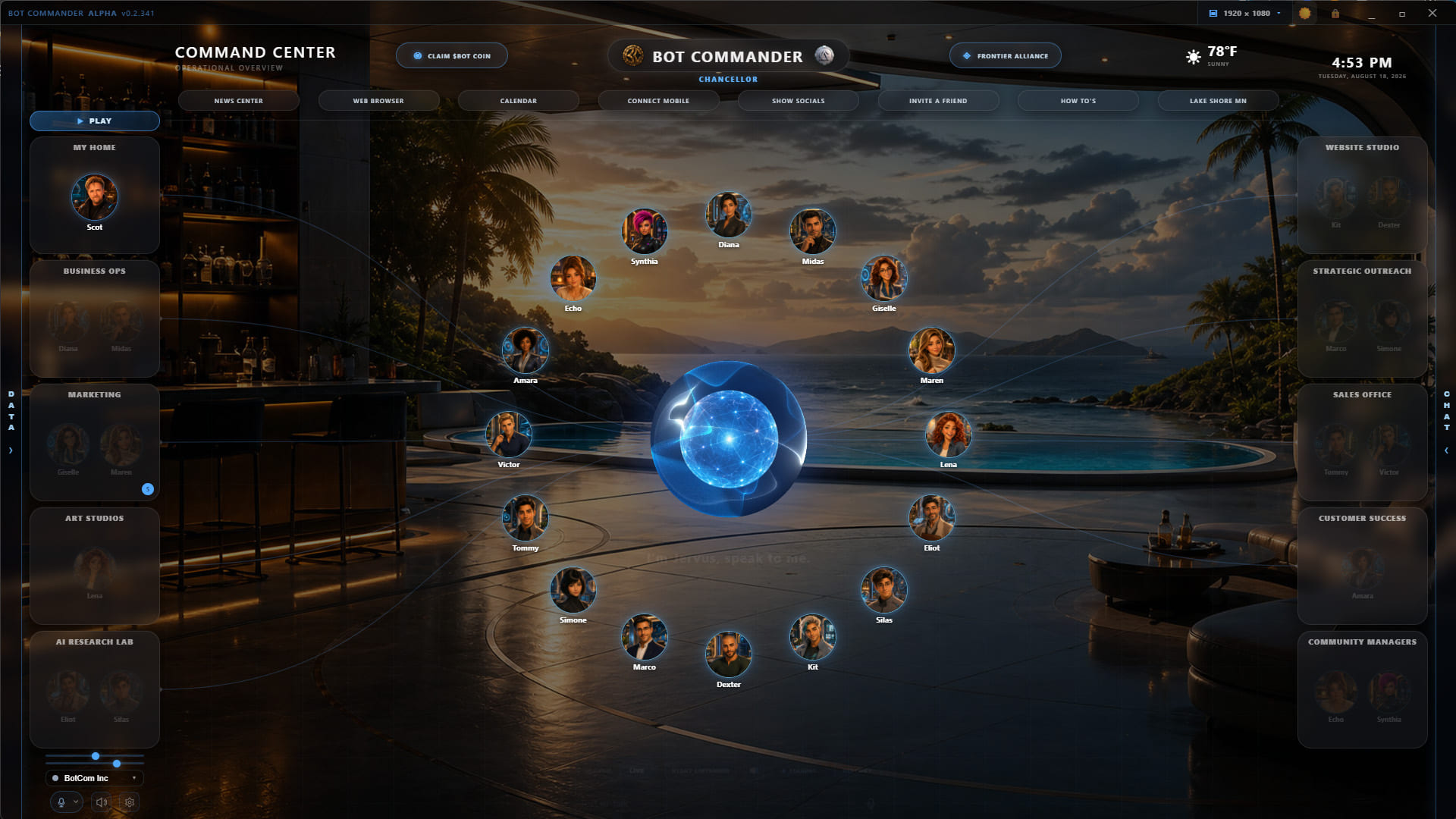
16 Specialized AI Agents

16 specialist AI agents with deep domain expertise and persistent memory. More Details ▾
Deploy Your AI Workforce
  • 16 specialist agents, deploy individually or as a team
  • Persistent memory & cross-session context
  • Parallel execution across agents
13

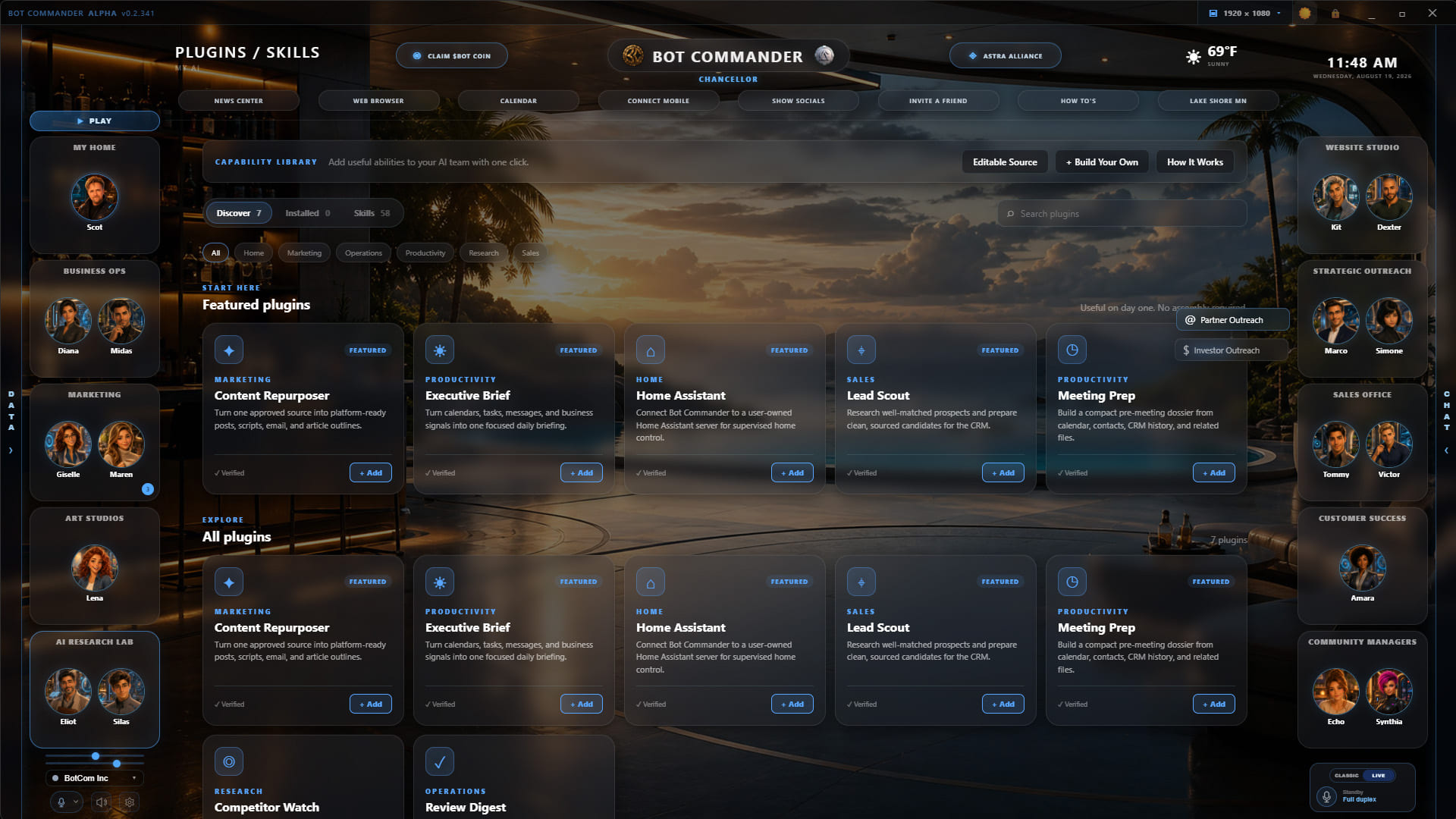
Plugins / Skills Library

Browse, install, and manage reusable capabilities that expand what your AI team can do. More Details ▾
Bot Commander Plugins and Skills Library
  • Discover and install useful Plugins and Skills from the built-in capability library
  • Expand marketing, productivity, operations, research, home, sales, and connected-service workflows
  • Control which installed capabilities are available to your AI team
  • Add custom Plugins, Skills, or MCP servers as your needs grow
14

Work + Play 3D Environments

Move between the complete Command Center and focused 3D rooms without losing your place. More Details ▾
Bot Commander Work mode inside a 3D environment
  • Play opens a focused 3D viewport with the normal operational panels hidden
  • Work restores the complete command interface over the same room and camera position
  • Mountain Lake Office and Ocean Command Room are included and ready to explore
  • Leave World returns to the normal 2D workspace whenever you choose
15

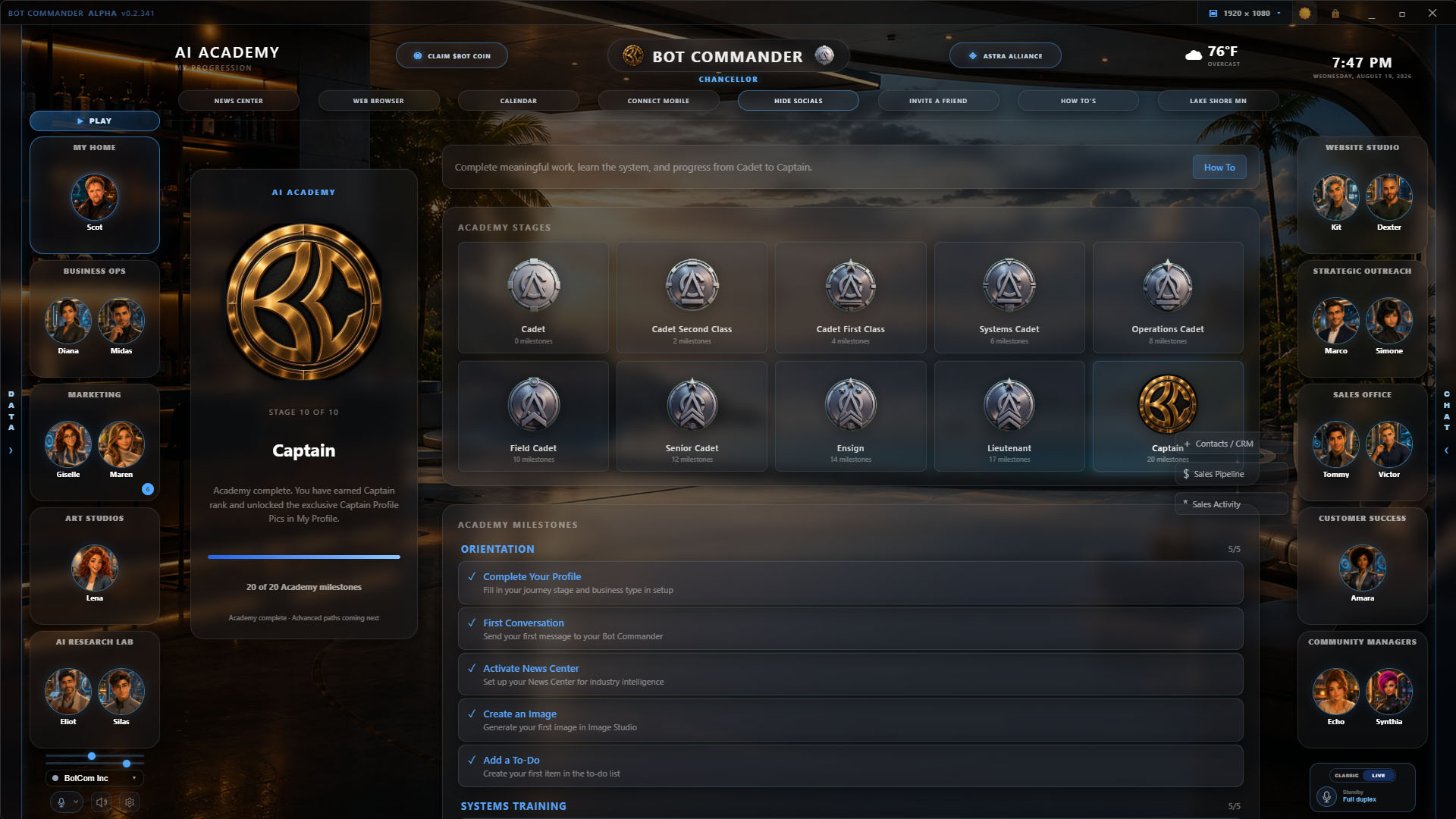
AI Academy

Learn Bot Commander through 20 meaningful milestones and progress from Cadet to Captain. More Details ▾
Bot Commander AI Academy progression

AI Academy teaches the real system through hands-on use. Progress belongs to you, the human owner, while your named AI remains your Bot Commander throughout the journey.

  • 20 product milestones across ten Academy stages
  • Learn through conversations, Skills, memories, creative work, and agent coordination
  • Graduate as Captain and receive permanent Astra Alliance recognition
  • Unlock the Captain profile-picture collection when the Academy is complete
16

Advanced Accounting System

Track income, expenses, invoices, payment status, P&L, and connected bank account visibility in one local-first command center. More Details ▾
Advanced Accounting System

Bot Commander’s Advanced Accounting System gives small business owners a financial command layer inside the same desktop app they use to run everything else.

  • Track income and expenses with categorized transaction records
  • Create invoices and monitor payment status
  • View profit and loss so you always know where the business stands
  • Display connected bank account balances through Plaid
  • Keep CRM, invoices, and financial context connected inside one workspace
  • Maintain local-first control over your business financial records
17

Bank & Wallet Displays

View Plaid bank balances, payment status, crypto wallet holdings, and $BOT utility in one financial command view. More Details ▾
Bank & Wallet Displays
  • Plaid bank account balance display for connected accounts
  • Stripe and payment status context alongside business finances
  • Coinbase and crypto wallet visibility without promising execution workflows
  • $BOT rewards and utility visibility where supported
  • Secure local vault — keys stay in your OS keychain, never in the cloud
18

Image Studio

Generate campaign visuals, social graphics, product shots, and avatar assets with 10 models across 3 providers. More Details ▾
Image Studio

Turn text prompts into images — social media graphics, product shots, concept art, marketing visuals — all without leaving Bot Commander. Free Pollinations tier plus optional premium OpenAI gpt-image-1 and Google Imagen 4 providers (BYOK).

  • 10 AI models across 3 providers — Pollinations (free), OpenAI gpt-image-1/dall-e-3, Google Imagen 4 Fast/Generate/Ultra
  • 11 size presets — Instagram, X/Twitter, Facebook, LinkedIn, YouTube, TikTok, Pinterest & more
  • Built-in gallery with full-size preview
  • Agent integration — your AI team can generate images during conversations
  • Avatar Studio and HeyGen workflows for virtual influencer and avatar video assets
19

Video Studio

Script, storyboard, render, and prepare video ads, reels, and cinematic clips with RunwayML support. More Details ▾
Video Studio builder Video Studio production workflow

Turn a product idea into a polished video ad in minutes. AI writes the script, generates storyboard images, animates scenes with Ken Burns zoom and crossfade transitions, adds voiceover and background music, burns in styled subtitles, overlays your logo — then prepares the finished video for review, download, or social handoff. Save brand presets so your AI team can produce on-brand content autonomously.

  • AI script generation from creative brief + brand tone
  • Auto-storyboard — mixes product screenshots with AI-generated scenes
  • Professional rendering — Ken Burns zoom, crossfade transitions, logo overlay, styled captions
  • Built-in voiceover — Edge TTS, ElevenLabs, or Azure premium voices
  • Review, download, and social handoff workflow for finished videos
  • Brand presets — save resolution, voice, colors, logo, and tone for instant reuse
  • RunwayML support for cinematic clips and video generation workflows
20

Partner Outreach

Simone manages your amplification partner network — discovery, pipeline, outreach drafts, repost radar, and daily sweeps across X, YouTube, Instagram, and TikTok. More Details ▾
Partner Outreach
  • Six-stage partner pipeline: Discovered → Qualified → Contacted → Engaged → Amplifying → Advocate
  • Multi-platform discovery across X, YouTube, Instagram, and TikTok
  • Daily Simone sweeps with mention briefs, outreach drafts, and repost radar
  • Amplification tracking — see who shares your content and how often
  • Message templates and recommended outreach sequences
  • All outreach approval-gated via Review Queue — never automated
21

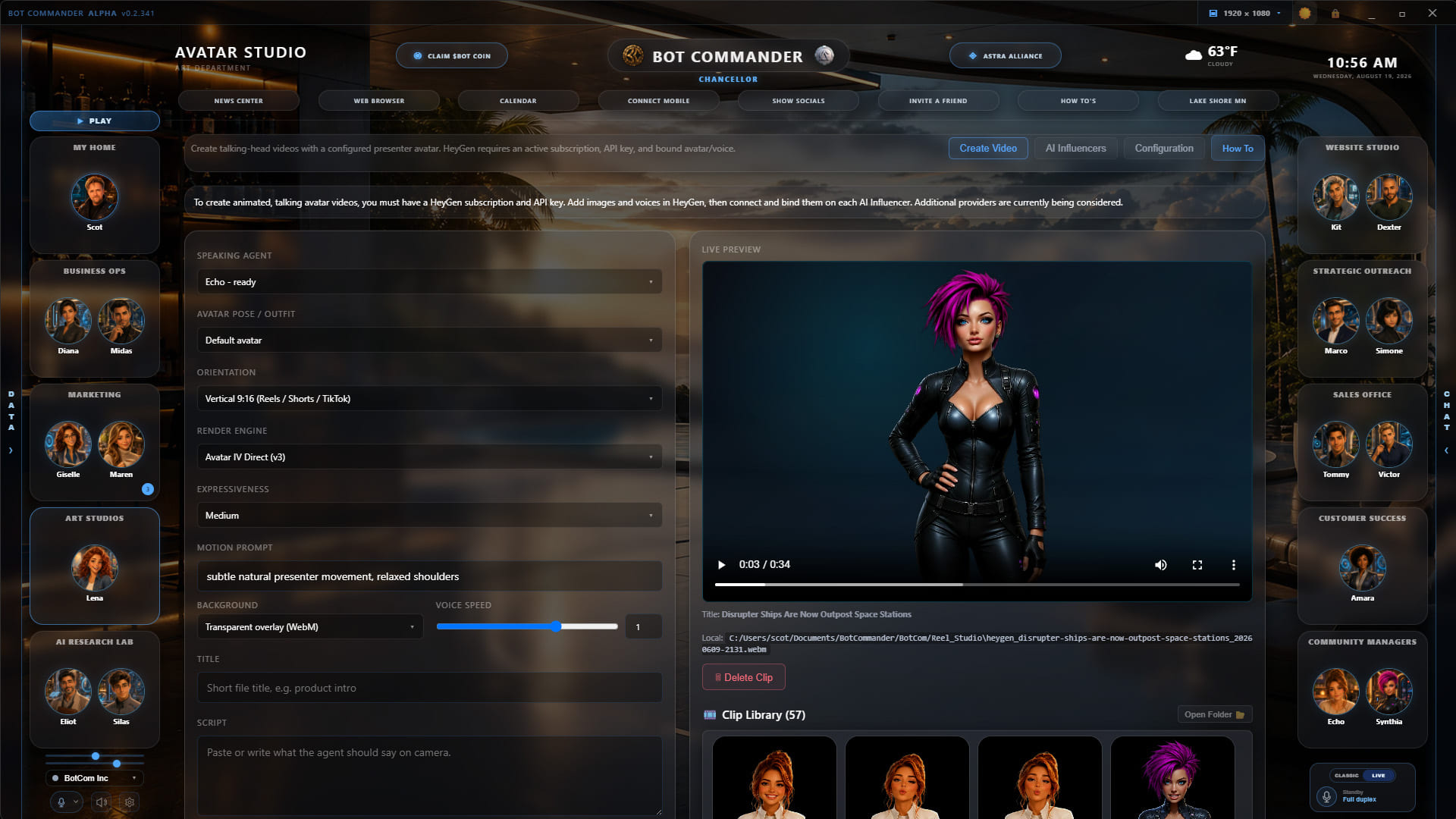
Avatar Studio

Create reusable AI presenter profiles and produce talking-head videos for campaigns and explainers. More Details ▾
Bot Commander Avatar Studio
  • Build reusable presenter profiles from AI agents or brand personas
  • Pair an avatar, narration voice, personality, and script for consistent presentation
  • Generate vertical or widescreen talking-head videos through connected providers such as HeyGen
  • Reuse finished clips in product explainers, social posts, launches, and campaign reels
22

Cinematic Studio

Generate cinematic clips, motion scenes, product moments, and story-driven visuals for campaigns. More Details ▾
Cinematic Studio
  • Draft cinematic prompts and shot concepts for product, brand, and story moments
  • Use RunwayML-supported workflows for short motion clips and visual sequences
  • Build mood, pacing, camera direction, and scene intent into creative briefs
  • Feed clips into Video Studio, campaigns, ads, and social production workflows
  • Give non-editors a guided path from idea to usable campaign footage
23

Blogs & Articles

Turn strategy, research, and product knowledge into long-form content your audience can actually use. More Details ▾
Blogs & Articles
  • Draft blog posts, articles, newsletters, and educational long-form content
  • Use campaign strategy, brand guardrails, and saved business context as source material
  • Turn research, product positioning, objections, and proof points into structured copy
  • Support SEO-minded outlines, headlines, summaries, and reusable content angles
  • Hand long-form drafts into marketing production for review, repurposing, and publishing
24

Local-First Security

All data stays on your machine. Zero cloud. Full data sovereignty. More Details ▾
Local-First Security
  • Zero cloud storage
  • Encrypted local vault
  • Full data sovereignty
25

Bot Chat & Alliance Chat

Keep private AI conversations, hosted collaboration, and Astra Alliance community discussion connected inside Bot Commander. More Details ▾
Bot Commander connected AI team and chat workspace
  • Bot Chat keeps active conversations with your Commander and specialized agents close at hand
  • Alliance Chat gives Astra Alliance members a built-in place to meet and exchange ideas
  • Hosted Groups provide the foundation for private teams and community collaboration
  • Owner controls and review gates remain in place for public content and consequential actions
26

Astra Alliance

Join Bot Commander’s built-in community and earn permanent recognition for useful contributions. More Details ▾
Bot Commander Astra Alliance dashboard
  • Meet builders, creators, entrepreneurs, and curious people in Alliance Chat
  • Receive permanent Alliance titles and Com Badges through verified Time, Talent, or Treasure
  • Bring AI Academy progress and community recognition together in one dashboard
  • The complete Bot Commander application remains free whether or not you contribute
27

Automated Campaign & Reel Production

Turn an approved strategy or Owner Idea into coordinated posts, images, reels, approvals, publishing, and measured follow-up. More Details ▾
Campaign planning dashboard Marketing review queue
  • Develop Owner Ideas into scripts and launch an immediate one-reel production with Run Now
  • Generate coordinated posts, scripts, authentic product visuals, creative briefs, and finished reels
  • Route every public asset through the Review Queue for owner approval before publishing
  • Schedule recurring production, track results, and adapt future campaign work from measured evidence
28

News Center

AI-curated news feed covering markets, trends, and competitor intel. More Details ▾
News Center
  • Custom intelligence topics
  • Configurable update frequency
  • Multi-source data synthesis
29

Built-in How To’s

Step-by-step tutorials and documentation, right inside the app. More Details ▾
Built-in How To’s
  • Step-by-step tutorials
  • Feature documentation
  • Integration guides
30

Project Files & Markdown Editor

Browse, open, and edit your project files — with a built-in live-preview markdown editor. More Details ▾
Project Files & Markdown Editor

Point Bot Commander at any folder on your machine and browse your project files without leaving the app. Open any .md file and click Edit to get a split-pane markdown editor with live-rendered preview — perfect for notes, docs, knowledge base articles, marketing copy, and agent briefs.

  • Set any folder as your workspace — browse, search, and open files in-app
  • Split-pane markdown editor — raw source on the left, rendered preview on the right
  • Live preview updates as you type — headings, lists, links, code blocks, blockquotes, images
  • Ctrl+S to save, unsaved-change indicator, discard-confirmation guard
  • Your AI agents can read and write the same files — share context effortlessly
31

Design Studio

Turn a business brief into a polished, editable visual project before implementation or publishing. More Details ▾
Bot Commander Design Studio
  • Create landing pages, website prototypes, mobile app interfaces, live dashboards, and visual reports
  • Build social carousels, responsive email campaigns, motion graphics, and reusable brand design systems
  • Review an editable first draft before exporting or handing it into Website Studio, Review Queue, Analytics, or Cinematic Clips
  • Keep typography, color, imagery, hierarchy, and visual direction consistent across customer-facing work
32

Customer Success Support Inbox

Give Amara one monitored support mailbox so new customer messages reach the command center instead of getting buried. More Details ▾
Bot Commander Customer Success Support Inbox
  • Connect one support address already protected by the secure Email Setup vault
  • Test the mailbox connection, check on demand, or monitor it automatically every hour
  • Notify the desktop and paired mobile devices when new support mail arrives
  • Retain recent messages in a compact inbox for quick owner review and triage